Sonido is a synthesizer you build yourself, and a small language for playing music on it, written in Common Lisp.
A synth in Sonido is a set of nodes (oscillators, envelopes, filters, effects, sequencers, MIDI inputs and so on) connected on screen: the output of one node goes into the inputs of others, and what comes out at the end is sound. You arrange the nodes in an editor, turning their knobs and drawing connections between them with the mouse, and you hear the synth change as you work.
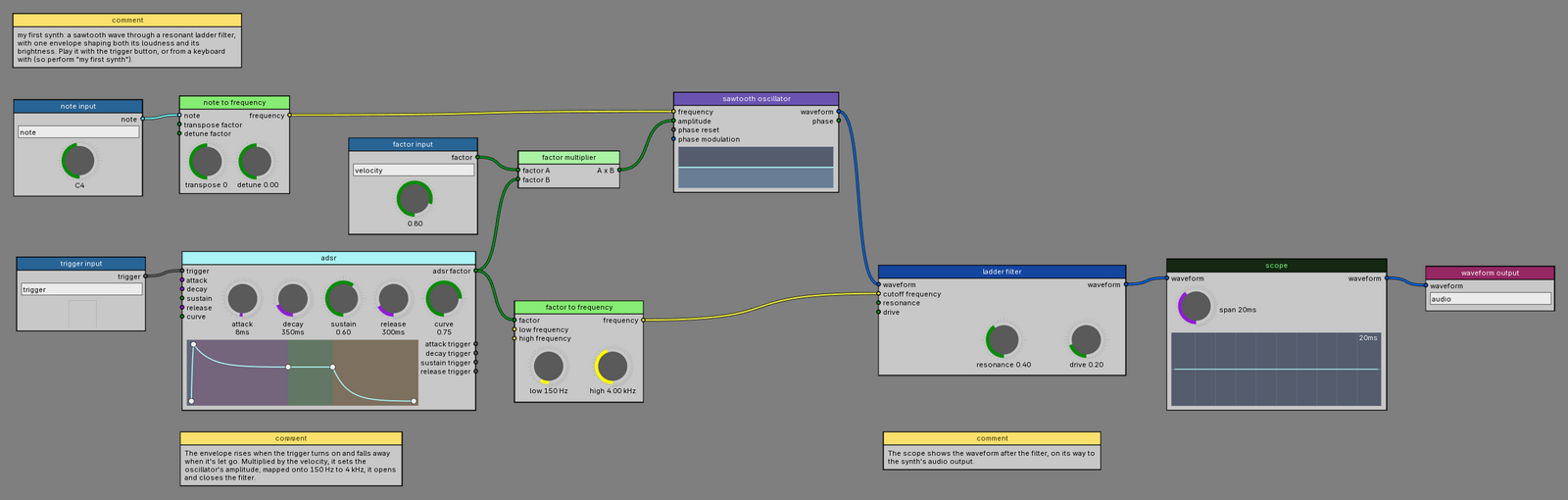
Each synth is saved as Lisp code, so it can be read, edited, copied and loaded like any other code. A synth can also become a single node inside another synth, so you can build a voice once and use it in a chord machine, a drum kit or a whole song.
Synths can be played from a MIDI keyboard, or from Lisp programs written in sonido-lang, Sonido's music language. Here is the beginning of "Daisy Bell", a program that comes with Sonido, played on one of its synthesized pianos:
Every sound Sonido makes is synthesized from scratch, as it plays. There are no recordings or sampled sounds anywhere in it: the piano above is oscillators, envelopes and filters, like everything else. Sonido comes with synths for all 128 General MIDI instruments and its 47 percussion sounds, built that way, along with a few demonstrations.
A tutorial on sonido-lang, the music language, will follow.
A MIDI keyboard is optional. Without one, Sonido starts without MIDI, and its MIDI nodes give their resting values.
Put the sonido directory somewhere ASDF can find it, such as ~/common-lisp/sonido, then load it with Quicklisp, which fetches the Lisp libraries it needs the first time:
(ql:quickload :sonido)
lisp
(so:start)                      ; start the sound, MIDI (if there's a device) and the windows
(so:edit-synth "my first synth") ; open an editor for a synth, new or saved
(so:stop)                       ; close the editors and shut everything down
lisp
so:start prints a line as it sets things up, ending with "ready" and the MIDI device it found, if any. so:stop is also run automatically when Lisp exits. Calling so:start again while Sonido is running restarts it.
Sonido's own functions are in the package sonido, whose nickname is so. The music language is in the package sonido-lang.
A node does one job: an oscillator makes a wave, an envelope makes a shape over time, a filter changes the tone of whatever goes through it. Each node is a box with its name across the top, its inputs down its left edge and its outputs down its right edge. Most nodes also have knobs, and many draw a graph of what they're doing.
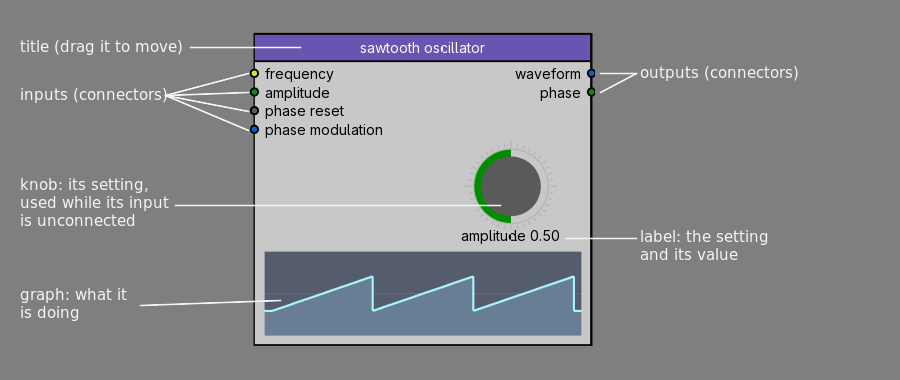
Every input that sets something, such as the oscillator's amplitude above, has a knob of its own. While the input isn't connected, the knob sets it; once you connect something to the input, the connection takes over and the knob disappears. (The oscillator's frequency input above is connected, so its frequency knob is hidden.) Inputs that only make sense when connected, such as a filter's sound input, have no knob.
The label under a knob says what it sets and its value: "amplitude 0.50", "attack 8ms", "cutoff 1.00 kHz".
The small coloured circles on a node's edges are its connectors. Each carries one type of value, shown by its colour, and an output can only be connected to an input of the same type. There are seven types:
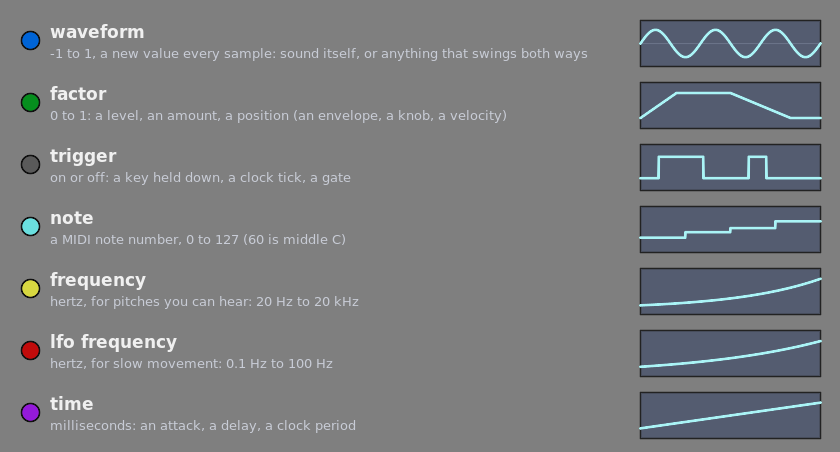
When the value you have is of the wrong type for the input you want, a converter node changes it from one type to another. "note to frequency", for example, turns a note number into the frequency an oscillator needs. There is a converter between every pair of types.
Connections are drawn as curves from an output on the right of one node to an input on the left of another, so a synth reads from left to right: the notes and controls come in on the left, and the sound goes out on the right.
A synth's sound comes out of its output nodes. Sonido works out each sample by asking the output nodes for their values; they ask the nodes connected to their inputs, which ask the nodes connected to theirs, and so on back to the start. So a node only runs if a chain of connections leads from it to an output. A scope that isn't connected through to an output, for example, shows nothing.
A synth is a set of nodes and the connections between them, saved under a name. While you're editing a synth, you hear it. Once it's saved, you can:
To be played these ways, a synth gets its notes and settings through synth input nodes, and gives out its sound through a synth output node. In the synth editor these are under inputs and outputs in the menu. Chapter 2 builds a synth like this, step by step.
Every change you make in the editor is saved at once, as Lisp code: a defsynth form that makes each node with its settings and position, and connects them. You never need to save, and you can read, copy or edit a synth's file like any other Lisp file.
(so:perform "acoustic guitar nylon") ; play a synth from the MIDI keyboard
(so:perform nil)                     ; stop
lisp
perform plays a saved synth from the keyboard, with as many notes at once as you play: each key you press plays a note of its own, setting the synth's note and velocity inputs and holding its trigger input on until you let the key go. The sustain pedal holds notes on until it's let up, and a synth with a "pitch bend" input follows the keyboard's pitch wheel. Calling perform again switches to another synth.
sonido-lang is a small language for playing music from Lisp: notes, rests, tempo, and patterns that repeat. A taste:
(in-package :sonido-lang)
(bpm 120)
(play acoustic-grand-piano :note c4 :duration eighth-note) (hold quarter-note)
(play acoustic-grand-piano :note eb4 :velocity 0.6) (hold quarter-note)
(play acoustic-grand-piano :note g4 :duration (dotted half-note))
lisp
A later chapter will teach it properly.
(midi-device 3)       ; the PortMidi device to take MIDI from, or nil for the first MIDI input found
(audio-threads nil)   ; how many threads make the sound, or nil for one per processor
(development-mode nil) ; when true, editing a bundled synth changes it in place
Contents